

Explore Anywhere. Move Your Way.
Plan custom routes, explore cities, and simulate smooth GPS movement right from your iPhone or iPad. Take control of where you go, how you move, and the routes you explore.
iOS & iPadOS 15.0 or later · Real-time simulation
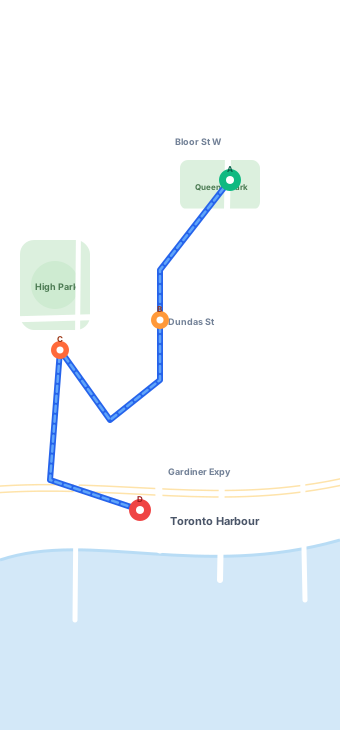
More Than a Point on the Map
iWhere GPS Route Explorer turns location into movement. Instead of simply choosing where you want to be, you can build routes, add stops, adjust travel speeds, and simulate the entire journey on the map.
Whether you're planning a trip, exploring a new city, or testing a location-based scenario, you stay in control of the route.
Build Your Route
Choose your starting point, destination, and stops along the way.
Interactive WaypointsMove Naturally
Simulate movement along your route with flexible speed controls.
Realistic Pacing & SpeedDiscover New Places
Explore cities, popular locations, and routes without physically traveling there.
Virtual City JourneysBuild the Route You Want to Explore
Create routes directly on the map and see your journey before you move. Choose where to start, where to go, and how you want to get there.
Choose Any Destination
Search locations and quickly create routes anywhere on the map with autocomplete and coordinates support.
Add Multiple Stops
Build more detailed journeys by adding multiple points along your route and reordering them on the fly.
Visualize Your Journey
See the complete route, distance, and path before starting the simulation with turn-by-turn clarity.
Turn Your Route Into Movement
Bring your planned route to life with smooth GPS movement simulation. Follow the route automatically and control how fast your virtual journey moves.
Adjust the speed anytime to match the journey you want to simulate.
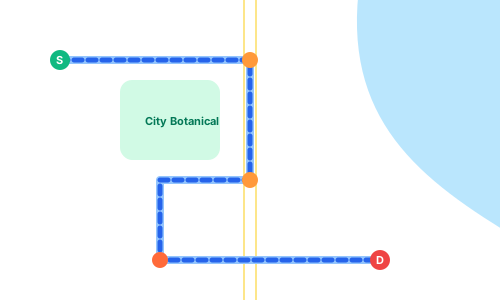
One Journey. Multiple Stops.
Not every journey goes straight from A to B. Add multiple stops to create more flexible routes and simulate complex trips exactly the way you want.
Add Stops
Create routes with multiple destinations. Seamlessly drop pins or search key waypoints along your travel itinerary.
Control the Path
Decide which locations your route passes through. Fine-tune alleys, scenic boulevards, or express highways to suit your exact needs.
Build Longer Journeys
Plan anything from a short city walk to a multi-stop trip. Combine dozens of points into a single seamless simulation session.
A New Way to Explore the World
Curious about a city you've never visited? Discover popular places, choose where you want to explore, and instantly turn them into virtual routes. Explore neighborhoods, landmarks, streets, and destinations from your device.
Active City PreviewNew York — Times Square → Central Park
Key Highlights:Broadway TheatresFifth AvenueThe Plaza HotelBethesda Terrace
Active City PreviewLondon — Big Ben → Tower Bridge
Key Highlights:Westminster BridgeSouthbank CentreTate ModernBorough Market
Active City PreviewTokyo — Shibuya → Tokyo Tower
Key Highlights:Shibuya CrossingAoyama DoriRoppongi HillsZojoji Temple
Active City PreviewParis — Louvre → Eiffel Tower
Key Highlights:Tuileries GardenPlace de la ConcordePont Alexandre IIIChamp de Mars
Pick a place. Create a route. Start exploring.
Your Journeys, Ready to Revisit
GPS Route Explorer keeps your previous routes organized, so you can quickly find and revisit journeys you've explored before.
Review Past Routes
Access full summaries of distance, stops, and timings.
Reuse Previous Journeys
Rerun identical simulations with one tap at any speed.
Keep Routes Organized
Clean chronological archiving for effortless recall.
One App. Many Ways to Explore.
From seamless vacation route design to developer testing and curious virtual tourism, iWhere GPS Route Explorer adapts to your scenario.
Preview Before You Go
Visualize routes and explore destinations before your next trip.Familiarize yourself with walking distances, neighborhood turns, and stop sequences before arriving at an unfamiliar destination.
Discover Cities From Anywhere
Explore streets, landmarks, and routes without being physically there.Virtually wander through Tokyo, Paris, or New York from the comfort of your home, observing travel times and geographical nuances.
Test Location-Based Scenarios
Simulate routes and movement for supported location-based testing scenarios.Streamline testing for geofencing, location-triggered events, navigation flows, and fitness-tracking app developments on real devices.
Turn Maps Into Interactive Experiences
Explore geography, routes, distance, and movement in a more visual way.Great for students, geography enthusiasts, and curious minds looking to understand spatial scale, transit topography, and urban grids.
Start Exploring in Three Steps
Get up and running in moments with an interface designed specifically for intuitive touch navigation on iPhone and iPad.
Choose Your Destination
Search for a place or select a location directly on the map.
Global SearchBuild Your Route
Add stops and choose the path you want to explore.
Multiple StopsStart Moving
Choose your movement speed and start the route simulation.
Smooth SimulationExplore Location Your Way
iWhere GPS Route Explorer brings route planning and movement simulation directly to your iPhone and iPad. Need more advanced location controls from your computer? Discover iWhere Location Changer for a broader set of GPS location tools.
 iOS / iPadOS
iWhere GPS Route Explorer
Explore & Simulate on iPhonePlan routes, add multiple stops, explore cities, and simulate movement directly on your device.
- Interactive multi-stop route planner
- Walking, cycling, and driving speed simulation
- Save and revisit previous journeys
iWhere Location Changer
Advanced GPS Control from Your ComputerChange virtual locations, create custom routes, simulate movement, use joystick controls, and manage more advanced location scenarios.
- One-click GPS location modification for iOS/Android
- Custom route simulation with virtual joystick
- GPX route file import and export capabilities
Frequently Asked Questions
Find answers to common questions about iWhere GPS Route Explorer for iPhone and iPad.
iWhere GPS Route Explorer is a route planning and GPS movement simulation app that lets you create custom routes, add multiple stops, explore locations, and simulate movement directly on your device.
Yes. You can add multiple points to create more flexible routes and simulate journeys with several stops.
Yes. GPS Route Explorer supports different movement speeds, making it easy to simulate walking, cycling, or driving.
Yes. Route History allows you to revisit previously created and simulated routes.
GPS Route Explorer is available for iPhone and iPad and currently requires iOS/iPadOS 15.0 or later.
View on App StoreGPS Route Explorer is free to download and offers optional in-app purchases.